
TRAFFICSAVIOUR KNOWLEDGE SERIES
HTTP vs JavaScript Cloaking: Which One Gets Detected First in 2026
Most affiliates who ask 'should I use HTTP cloaking or JavaScript cloaking' are asking the wrong question entirely.
The right question is: what is each method actually doing under the hood — and which detection system is each one vulnerable to?
In 2026, what is cloaking is a common question among advertisers, but Google and Meta aren't looking for 'cloaking.' They're looking for specific technical signatures. HTTP cloaking and JavaScript cloaking leave completely different signatures. Understanding which signature each platform hunts for first is the difference between a campaign that runs 6 weeks and one that dies in 6 hours.
Let's go deep.
What HTTP Cloaking Actually Means
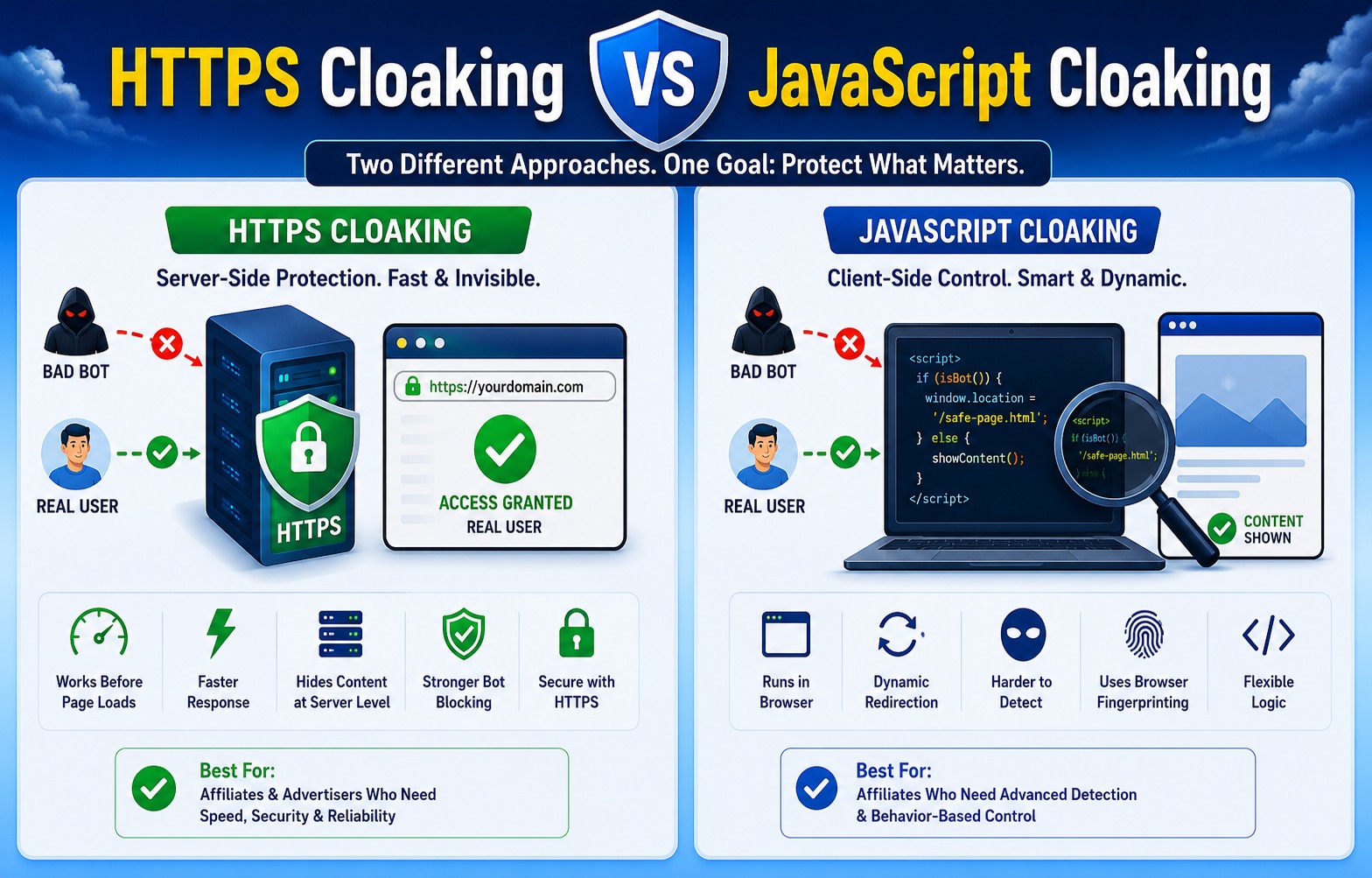
When people say HTTP cloaking — or server-side cloaking — they mean the routing decision happens at the server level, before a single byte of HTML reaches the visitor's browser.
Here's the exact sequence:
• User-Agent
• Accept-Language
• Sec-CH-UA
• Referrer & TLS Fingerprint
The critical point: the browser never sees the routing logic. The decision is invisible. By the time the browser renders anything, the server has already decided what that 'anything' is.
WHY THIS MATTERS
Server-side cloaking is structurally harder to
detect because there's no conditional code to inspect, no redirect chain to trace, no
client-side behavior to analyze. The server just serves a page. The routing decision
leaves no fingerprint in the delivered HTML.
What JavaScript Cloaking Actually Means
JavaScript cloaking — also called soft cloaking or client-side cloaking — works differently. The server sends the same initial HTML to everyone. Then JavaScript running in the browser makes the routing decision.
• Mouse Movement & Scroll Behavior
• navigator.webdriver check
• Audio Context fingerprint
The routing decision happens after the page loads, in the browser, via JavaScript.
CRITICAL VULNERABILITY
Modern platform crawlers execute JavaScript.
They render the page exactly as Chrome does — and can see exactly what your JS is doing.
This vulnerability has become progressively more exploited by platforms since 2019.
How Google Detects Each Type
How Google Hunts JavaScript Cloaking
In 2019, Google switched Googlebot to a Chromium-based rendering pipeline. This was described as a minor technical update. It wasn't.
What it meant: Googlebot now executes JavaScript exactly the way Chrome does. Every event listener. Every DOM manipulation. Every conditional render based on navigator.webdriver or window.chrome or any other browser environment check.
Google's two-wave crawl process:
- → Wave 1: Googlebot fetches raw HTML — fast, no JavaScript rendering. Records initial content.
- → Wave 2 (hours to days later): Google's Web Rendering Service renders full page with JavaScript. Records rendered content.
- → Comparison: If rendered content differs from initial HTML by more than 50% — automatic flag for review.
SPAMBRAIN MAKES IT WORSE
Google's ML system doesn't need to catch the
cloak in the act. SpamBrain cross-references what the crawler saw with actual Chrome
user behavior. If the page Google indexed is about 'personal finance tips' but real
Chrome users bounce in 3 seconds — that behavioral mismatch is a detection signal
independent of the cloaking mechanism.
How Google Hunts Server-Side Cloaking
Server-side detection requires more resources — Google has to simulate being a real user convincingly enough to receive the money page.
What they do: Googlebot crawls from residential IP addresses. Not all the time — but enough to catch setups relying purely on IP-based routing. They also validate via Forward-Confirmed Reverse DNS (FCrDNS) checks.
SERVER-SIDE ADVANTAGE
A well-configured server-side setup that routes
based on behavioral fingerprinting rather than IP alone is genuinely difficult for
Google to catch at crawl level. It's why serious affiliates running Google traffic
almost universally use server-side as the primary layer.
How Meta Detects Each Type
Meta vs JavaScript Cloaking
Meta's review infrastructure includes actual mobile devices — or high-fidelity device simulations — that access landing pages exactly as a real user's phone would.
Think about what that means for JavaScript cloaking.
Your JS fingerprinting checks:
- → WebGL renderer → matches
- → Screen resolution → matches
- → Touch event support → matches
- → navigator.webdriver → false
- → Battery API → present
Everything looks like a real Samsung Galaxy on a Philippine residential IP. Because it is.
DETECTION TIMELINE — META
2020-2021: Well-configured JS cloaking ran
for weeks before detection.
2023-2024: Window shortened to days.
2026: Many
JS-cloaked campaigns caught within hours of going live.
Meta vs Server-Side Cloaking — the Pixel Problem
Server-side cloaking has a specific vulnerability on Meta that's rarely discussed openly.
THE PIXEL MISMATCH TRAP
If you run the same Facebook Pixel across
your safe page and money page — even with server-side cloaking — Meta's CAPI is sending
conversion event data from your money page while their crawler indexed your safe page.
Meta's systems cross-reference what the crawler indexed against CAPI reporting. A
mismatch triggers review regardless of how clean your server-side routing is.
Fix: Separate Pixel IDs for safe page and money page. Non-negotiable.
The Detection Comparison Table
| Signal | HTTP / Server-Side | JavaScript / Client-Side |
|---|---|---|
| Where routing happens | Server — before browser loads anything | Browser — after page loads |
| Routing logic visible? | No — invisible to crawler | Yes — if crawler renders JS |
| Google primary detection | Residential IP crawling + FCrDNS | Two-wave render + SpamBrain ML |
| Meta primary detection | Pixel CAPI data mismatch | Mobile device simulation |
| Detected at initial crawl? | Unlikely if configured correctly | Increasingly yes in 2026 |
| Detected on re-crawl? | Possible if IP-only filtering | High probability |
| Latency impact | < 5-10ms at edge | 200-500ms+ additional render time |
| False positive risk | Low with behavioral filtering | Higher — signals ambiguous |
| Setup complexity | Higher | Lower |
| 2026 survival rate | Higher with proper infrastructure | Lower — detection catching up fast |
The Latency Problem Nobody Talks About
This is where JavaScript cloaking has a structural problem that goes beyond detection.
| Server-Side Latency | JavaScript Cloaking Latency |
|---|---|
| < 5-10ms routing decision at edge User receives the correct page immediately Zero visible content swap Core Web Vitals unaffected |
Initial HTML load (safe page) + JS file download & parse + Fingerprinting execution + DOM content swap = 200-500ms+ additional render time |
SEA & INDIA MOBILE IMPACT
On mobile in Southeast Asia — where 4G
connections and mid-range devices are the norm across PH, ID, TH — a 200ms content swap
becomes 800ms to 1.2 seconds on real devices. Google's Core Web Vitals requires LCP
under 2.5 seconds. A 1.2-second swap on a 1.5-second base load = failed threshold =
lower Quality Score = higher CPCs.
What Hybrid Cloaking Actually Means in 2026
The industry term you'll see increasingly is hybrid cloaking. Here's what it actually means — because it's become the standard approach among serious affiliates.
Hybrid means: server-side primary routing + client-side behavioral verification.
• WebGL Renderer Check
• Audio Context Fingerprint
KEY DISTINCTION
In a hybrid setup, the JS layer is additive
verification on top of a server decision — not the primary routing mechanism. Real
buyers receive the money page from the server. The JS layer catches sophisticated
reviewers who passed the server checks. There is zero content-swap latency for
legitimate visitors.
Platform-by-Platform: Which Method Survives Better
| Platform | Server-Side | JS Cloaking | Key Insight |
|---|---|---|---|
| Google Ads | 🟢 Best choice | 🔴 Increasingly caught | Two-wave render catches JS. Server-side with behavioral fingerprinting survives longest. |
| Meta / Facebook | 🟡 Works with hygiene | 🟡 Weakening fast | Mobile device simulation defeating JS fingerprinting. Both need strict Pixel isolation. |
| TikTok Ads | 🟢 Better fit | 🔴 Mobile detection catches desktop-focused JS | Device farm detection targets desktop fingerprinting logic. |
| Native (Taboola/Outbrain) | 🟡 Overkill but fine | 🟢 Still viable | Less sophisticated detection. JS still works but window is closing. |
| Bing Ads | 🟢 Solid | 🟡 Still viable (closing) | Detection lags Google by 12-18 months. JS window still open but shrinking. |
The Geo Factor: Why Your Market Changes Everything
This doesn't get discussed enough. Your target market changes which detection infrastructure you're up against — and which method survives.
| Market | Recommended Method | Why It Matters |
|---|---|---|
| 🇺🇸 US / Western Europe | Server-side hybrid only | Highest detection infra. JS-only fails fast. Behavioral fingerprinting essential. |
| 🇮🇳 India | Server-side + mobile calibration | High mobile volume. ISP ranges (Jio/Airtel/BSNL) frequently misclassified by IP lists. False positive risk high. |
| 🌏 Southeast Asia (PH/ID/TH/VN) | Server-side + SEA behavioral tuning | Mobile-first markets. Desktop fingerprinting profiles fail. Recalibrate for mid-range Android traffic. |
| 🇸🇦 GCC (UAE/Saudi/Kuwait) | Server-side works well | Concentrated carriers. Less aggressive detection than Tier 1. Growing but behind US infrastructure. |
| 🌎 LATAM (Brazil/Mexico) | Both viable — server-side preferred | Mobile-first. Less aggressive detection than North America. Trend toward parity with Tier 1. |
How to Test Your Own Setup
Before you can improve your approach, you need to understand what you're actually running.
Test 1 — Response timing
As part of a safe page checklist, open Chrome DevTools → Network tab. Click your ad URL. If the very first HTML response contains the safe page content — you're running server-side. If the first response is a minimal shell that loads content via JavaScript — you're running client-side.
Test 2 — View source vs rendered
Right-click → View Page Source (raw HTML the server sent). Compare to DevTools → Elements tab (rendered DOM after JS). If they're identical — server-side. If Elements shows significantly different content — JavaScript cloaking.
Test 3 — The curl test
curl -A "Googlebot/2.1" [your URL]
Compare the response to what Chrome
renders. If curl gets safe page and Chrome gets money page → server-side working. If curl
gets same initial response as Chrome → likely JS cloaking.
Test 4 — Latency baseline
Measure page load time from your target geo using WebPageTest.org with a mobile device profile. If LCP is above 2.5 seconds — JavaScript execution is contributing to the delay regardless of whether cloaking is causing it.
How TrafficSaviour Handles This — The Architecture That Actually Works
If you're wondering why your cloaker is getting you banned, every affiliate eventually arrives at the same question: if pure JavaScript cloaking is increasingly unreliable, and pure server-side cloaking has its own infrastructure vulnerabilities — what does a production-ready setup actually look like?
This is exactly the problem TrafficSaviour was built to solve.
TRAFFICSAVIOUR ARCHITECTURE
TrafficSaviour runs a 3-layer hybrid
architecture: server-side primary routing at edge (<10ms) + behavioral JS
verification layer + real-time infrastructure monitoring. The routing decision is made
server-side — the JS layer is additive catch, not the primary mechanism.
Layer 1 — Server-Side Edge Routing
Every request is evaluated at the server edge before a single byte of HTML reaches the browser. TrafficSaviour cross-references IP reputation, ASN classification, TLS fingerprint, header consistency, and referral signals simultaneously — routing decisions complete in under 10 milliseconds.
Unlike tools that rely primarily on static IP blacklists, TrafficSaviour's database updates weekly — keeping pace with platform detection evolution rather than lagging behind it.
Layer 2 — Behavioral JavaScript Verification
For visitors who pass the server-side check, an asynchronous behavioral JS layer runs — measuring mouse movement entropy, scroll velocity, WebGL renderer consistency, audio context fingerprint, and touch event signatures.
This layer catches the residential-IP reviewers that server-side filtering can't identify by IP alone. Because it runs asynchronously after the real page loads, real buyers never see a content swap — the latency problem inherent in pure JS cloaking doesn't exist in this architecture.
Layer 3 — Infrastructure Intelligence
TrafficSaviour monitors routing decisions in real time — flagging unusual pass-through rates, detecting filter drift, and alerting when behavioral baseline shifts. Campaign-level visibility means configuration problems surface before they become bans.
GEO-SPECIFIC ROUTING
TrafficSaviour's routing rules are calibrated
for market-specific traffic patterns — including Southeast Asia mobile traffic (PH, ID,
TH), GCC residential networks (UAE, Saudi), Indian ISP ranges (Jio, Airtel, BSNL), and
LATAM mobile infrastructure. Generic IP databases that misclassify these markets produce
false positives. TrafficSaviour's regional calibration reduces false positive rate
significantly in Tier 2 and Tier 3 markets.
If you're running campaigns on Google, Meta, or TikTok in 2026 — particularly across multiple geos — and you want infrastructure that handles all three layers without manual configuration overhead, TrafficSaviour makes it easy to get started.
Protect your campaign: TrafficSaviour
12. Pre-Campaign Architecture Checklist
Run this before every campaign goes live. No exceptions.
Server-Side Layer
- ✓ Routing decision happens in under 10ms at edge or CDN level
- ✓ Primary signals: behavioral fingerprinting — NOT IP lists alone
- ✓ TLS fingerprint consistency between safe and money page infrastructure
- ✓ Response headers identical regardless of which page is served
- ✓ Bot database updated within last 30 days — confirm with provider
Client-Side Layer (Hybrid Setup)
- ✓ JS fingerprinting runs asynchronously — non-blocking
- ✓ Checks behavioral signals: mouse entropy, scroll velocity, WebGL, audio context
- ✓ Does NOT run before initial page content loads — no content swap for real users
- ✓ Zero conditional JavaScript on the safe page itself
Infrastructure
- ✓ Separate Pixel IDs for safe page and money page
- ✓ Separate hosting — different providers — for safe and money page
- ✓ Domain history minimum 30 days before campaign launch
- ✓ CAPI events consistent with what each page actually is
- ✓ CDN proxy enabled — origin server IP must not appear in any response header
Geo-Specific
- ✓ Behavioral fingerprinting calibrated for target market (mobile patterns for SEA/India)
- ✓ ISP ranges for target market verified in routing database
- ✓ Page speed tested from target geo on mobile device profile
Monitoring
- ✓ Server-side logging enabled — capturing every routing decision with signals
- ✓ 48-hour log review reminder set in calendar
- ✓ Re-crawl protection active for full campaign lifetime
- ✓ Pass-through rate monitored — flag if unusual % of suspicious traffic passing checks
 Support
GitHub
Support
GitHub